


How It Works
Step 1
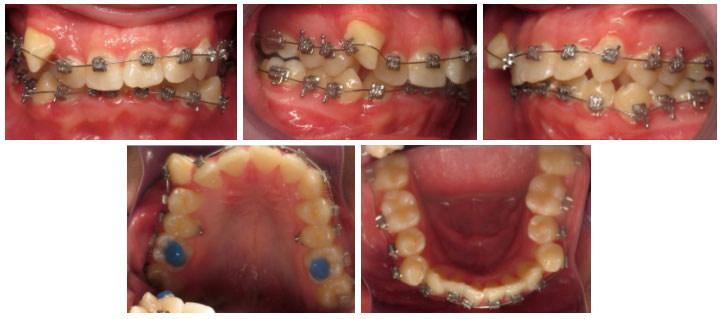
Take 5 photos of your teeth at the angles shown below.
Invisalign patients, please take the full set twice, once with your aligners in and once with them out, for 10 photos total.
This video shows you how: https://vimeo.com/342453720
Step 2
Email the patient's name and your photos to us at team@niajonesortho.com.
Please include a good phone number where we can reach you once we've reviewed your photos, along with any specific concerns about your or your child's teeth.
Invisalign patients, also let us know which aligner number you're currently wearing, and whether you have any food traps between your teeth. Be as specific as you can.
Step 3
Dr. Jones will review your photos and your email, then we'll be back in touch with the next steps.
VERY IMPORTANT: Our office uses encryption when we email our patients. When you email us, though, that information may not be encrypted. Because it travels over the Internet, a third party could potentially access and read it. And once an email reaches your inbox, someone with access to your account could read it too.
HIPAA stands for the Health Insurance Portability and Accountability Act.
HIPAA was passed by the U.S. government in 1996 to establish privacy and security protections for health information.
Information stored on our computers is encrypted.
Many popular email services don't use encrypted email.
Email is a popular, convenient way to communicate, so in its latest update to HIPAA, the federal government offered guidance on email. The guidelines say that if a patient understands the risks of unencrypted email and consents to receive health information that way, a health entity may send personal medical information by unencrypted email.
HIPAA information:
https://www.govinfo.gov/content/pkg/FR-2013-01-25/pdf/2013-01073.pdf